Users Guide
A full project sync, clear, and build cycle is shown in this sequence diagram. The actions shown in the diagram are described in more detail in the section below.
Actions
The behaviors of this package are manifest as a set of actions which can be performed on certain objects. Each of these actions is avialable as a Django Admin action run in a dramatiq worker as a background task. The service methods are available as well to allow integration of this package into your ecosystem.
Each action is described below.
Complete Order
For each
VendorOrderLinein the current vendor order:Creates an
InventoryLineAction,Adds the ordered quantity of parts to the
InventoryLineassociated with thePartin the vendor order.
Persiss the
fulfilledtime for the vendor order
Sync Project Version
Reads the current project version bill of materials (BOM) from the git repo and commit associated to the
ProjectandProjectVersion.Creates a
ProjectPartandProjectPartFootprintReffor each line on the BOM.If there is are any
ImplicitProjectPartsassociated to thePackagefor aPartthen aProjectPartwill be created for the implicit part.If a BOM line cannot be matched to any part then:
If the BOM line has “Vendor” equal to “Mouser” and the
CTB_MOUSER_API_KEYis set then aPartwill be created to match the resource in the Mouser Search API wich matches the “PartNum” from the BOM line,Else a
ProjectPartwill be created with amissing_part_desriptionrather than apartrelation. This dissonance must be resolved manually by correcting the BOM or by creating a suitablePartand re-syncing the project version.
Removes any outdated
ProjectPart.Persists the
synctime for the project version.
Clear to Build
Looks for sufficient quantity to cover the bills of material for the project build lot in inventories with common owner to project build.
If sufficient quantity is found then those parts necessary are reserved from their inventory lines, and the
ProjectBuildclearedtime is persisted.Otherwise, a
ProjectBuildPartShortageis created for each part that is short indicating lacking quantity.
Cancel Build
Releases any
ProjectBuildPartReservationassociated with the project build, returning that number of parts to their respective inventory lines.
Complete Build
Utilizes any
ProjectBuildPartReservationassociated with the project build, forever removing that number of parts from their respective inventory lines.
Generate Orders from Shortfalls
Searches for all
ProjectBuildPartShortageobjects associated with a selectedProjectBuild.Creates
VendorOrderandVendorOrderLineobjects to cover shortages for anyPartwhich has aVendorPartWill reuse existing
VendorOrderandVendorOrderLineobjects—adding to the order quantity—if they exist for aPart.
Models
Django Clear-To-Build utilizes the following data model to achieve those actions and persist the data required to perform those actions.
The relationships between the data are depicted in this handy diagram:
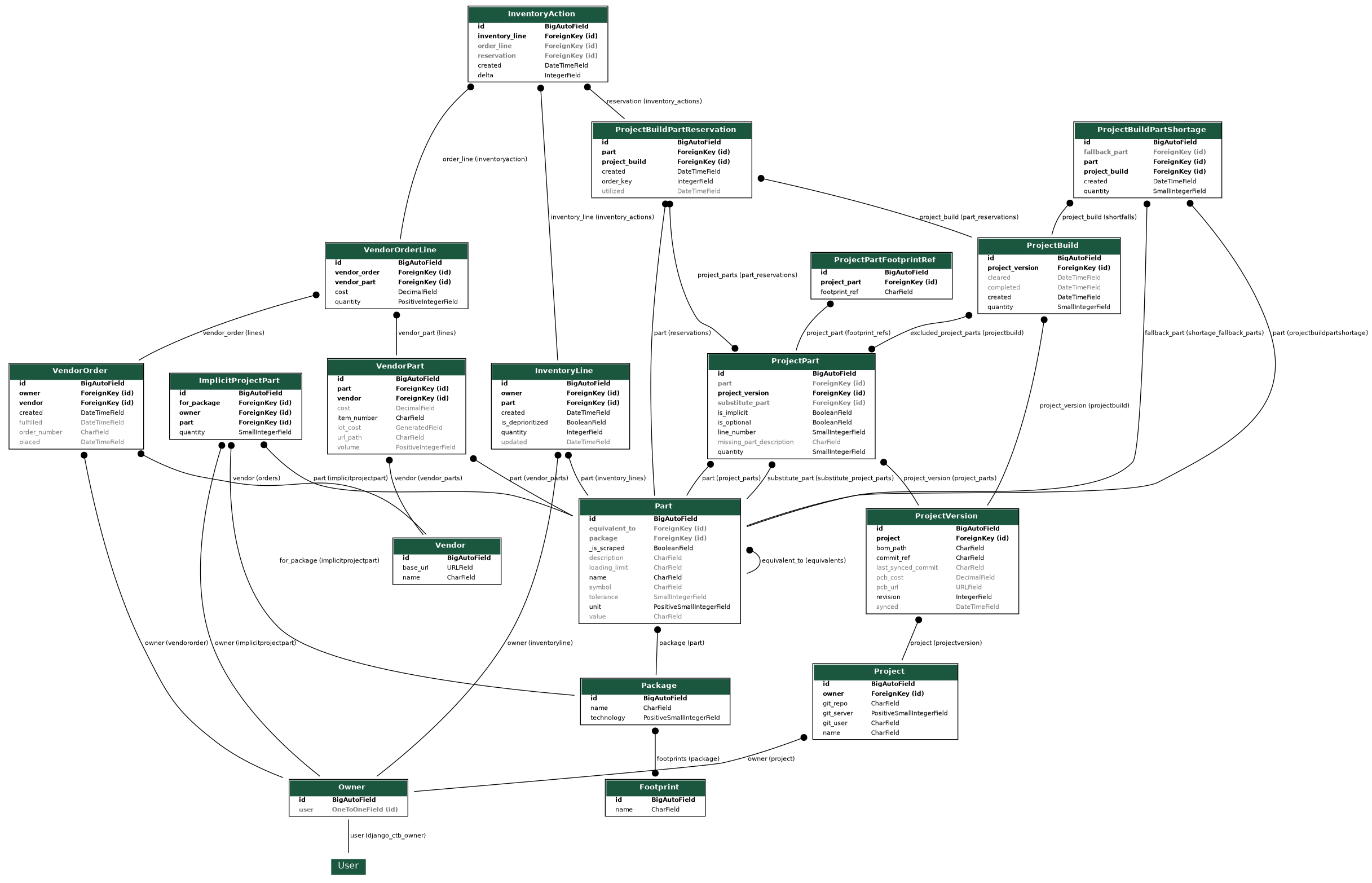
The Django models themselves are described below:
Vendor
Places where parts can be procured. e.g. Mouser, Tayda Electronics
Part
Individual parts which are available for procurement from a vendor and will be assembled into a project. e.g. a 100 Ohm surface mount (0805) resistor, or an NPN TO-92 transistor.
The value attribute of the part will be matched to the value row on the bill of materials.
Package
The form factor for a part. E.g. Surface mount 0805, or TO-92.
Footprint
The manifestation of the part onto the printed circuit board. The footprint appears on the bill of materials, parts will be selected based in part on the footprint name match.
VendorPart
The representation of a part as sold by a vendor. Pricing, item numbers, url paths are stored here.
Owner
The entity who owns the physical inventory and projects. This optionally maps to a User. All the models described below this section are traceable (explicitly or indirectly) to an owner allowing this entity sole access to those resources. Any models documented above this section are shared among all users (although CRUD permissions may still be exercised).
VendorOrder & VendorOrderLine
Individual orders (and the line items of the order) of parts from a vendor.
When orders are fulfilled the parts in the order will be represented as inventory lines.
VendorOrder objects are explicitly tied to an owner.
InventoryLine
A collection of parts on hand as represented by individual lines. Inventory lines reference a specific part (independent of vendor_part) and provide the quantity of unreserved parts on hand.
InventoryLine objects are explicitly tied to an owner.
InventoryAction
Tracks changes to inventory lines when orders are fulfilled and when project build parts are reserved
Project
A thing you are building. This is a thin model with just a name and a url to a git repo. The repo must have a CSV file which is the Bill Of Materials (BOM) for the project. KiCAD generates such BOMs as a default feature.
Project objects are explicitly tied to an owner.
ProjectVersion
A point-in-time representation of the project. Requires a commit ref (branch, tag, or commit hash) which exists in the repository, and the path within the repo to the bill of materials.
It is recommened that you set the commit_ref to the default branch for the repo until your bill of materials has stabilized, after this point a git tag is a useful placeholder for the state of a repository at a specific project version. (The author uses tags like v0, v1, etc. once manufacturing of a project version has begun.)
ProjectPart & ProjectPartFootprintRef
Upon sync (described below), the parts represented on the bill of materials will be associated to the project.
Each footprint ref (e.g. R12 and C3) that appears in the bill of materials will be represented.
ProjectPart may be marked as “optional” (via the is_optional attribute), indicating that they may be excluded from a ProjectBuild. ProjectPart may have a substitute_part which, when provided, will completely replace the part in the clear-to-buld process (adding a substitute_part to an already cleared project will have no effect, you will have to trigger the project to be cleared again).
ImplicitProjectPart
Sometimes there are parts which don’t appear on the bill of materials but that will be included in the final project. An example is the knobs are added to the potentiometer, and the bezels for the LEDs. They’re not electrical components, but they are needed for a complete build.
Parts like these can be associated to a given Package and will be included in as a ProjectPart when the bill of materials sync process for a project version is complete.
ImplicitProjectPart objects are explicitly tied to an owner.
ProjectBuild
Represents a manufacturing run of a project version. Specify the number of instances of the project version that you will build.
Any ProjectPart objects which were marked “optional” may be added to the excluded_project_parts. When added, these project parts will not be omitted from clearing actvities.
When cleared (described below), the parts needed to build the lot will be reserved from the inventory.
When completed these reservations will be utilized.
VendorOrder objects and lines therein can be created for any ProjectBuild object which has shortfalls by selecting the project build from the admin index and running the “Generate orders from shortfalls” action.
ProjectBuildPartShortage
When a project build cannot be cleared due to a lack of parts in the inventory a part shortage will be created.
A fallback_part can be defined for any part shortage, the part specified will be used to fill that shortage the next time the build is cleared.
ProjectBuildPartReservation
When a project build is cleared reservations for each part will be created. If the build is canceled then the reservations will be disolved and the parts will be returned to the inventory.
When the build is complete the reservations are marked utilized.